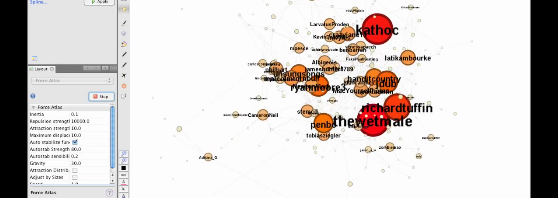


This is a quick demo of how the new timeline feature works in Gephi 0.7 beta. We’ve used 5 hours worth of @reply data from the Twapperkeeper archives for the #spill hashtag. This period corresponds to the ‘acute event’ in Australian politics that kicked off the election that sidetracked our research (in all kinds of productive ways, of course) – the day (the evening, and then the next morning) when now-PM Julia Gillard overthrew then-PM Kevin Rudd. Please don’t read too much (or indeed anything) into the actual analysis here, but for the sake of completeness: I’ve indicated betweenness centrality with both colour (red at the high end, yellow at the low end) and size.
The possibilities here are very interesting, particularly if we use better quality data that is properly set up for longitudinal analysis – e.g. so the nodes scale up and down properly through time. I’m pretty sure Axel has one of his epic and highly detailed methods posts up his sleeve in relation to all this, but for now, enjoy the pretty moving pictures – and apologies for the jerky cursor movements – I’m on the road and so without a mouse.
If you’re interested in any of the detail it is probably best viewed at the YouTube website in HD and fullscreen:
Love it.
Needs a soundtrack.. X175 would be good – by John Babbage.. oh, and i want a still on a tshirt.. Cheers.
cheesy audioswap soundtrack: actioned.
T-shirts: you don’t know what you might have started!
Merch is a great idea! I might add a cheesy soundtrack from the audioswap offerings…
Neet! And 10/10 stars for the backround track as well!;)
I wonder how well does it scale? Consider the real-time layout re-drawing and implemtation in Java. Would it work with network of ~5k nodes?
Thanks! Actually the total number of edges in the dataset is 2008, and as long as you bump up Gephi’s RAM allocation it handles that number no problem at all.
By the way, the original dataset was much bigger – this version includes only nodes with an indegree of 5 and above.
Thanks Jean for your reply! Actually I would need to work with about 80k of edges – I tried it, but it gets frozen or it crashes. Is there some secret ‘spell’ which I can use to make it work?
I guess you already allocated more memory to Gephi using the instructions here: http://gephi.org/users/install/ – other than that, I’m not sure. It might be worth asking at the gephi forum for other tips and tricks…